
During a project I needed to make the user upload a csv-file to a controller, process it and store the result in a database.
The upload form
A simple html-form object is enough to be able to upload a file to a controller. asp-controller and asp-action tag helpers makes it easy to point the form to the right controller/action. The accept=".csv" parameter lets us specify file formats the user can pick from. To be able to upload files the form needs to encode the data with the enctype="multipart/form-data".
Of course, if you want more control over the upload you can write javascript code and make an Ajax-request.
    <form method="post" asp-controller="FileUpload" asp-action="UploadCsv"
          enctype="multipart/form-data">
        <div class="custom-file">
            <input class="custom-file-input"
                   type="file"
                   id="Files"
                   name="FormFile"
                   accept=".csv"
                   aria-describedby="inputGroupFileAddon01" />
            <label class="custom-file-label" for="inputGroupFile01">Choose file</label>
        </div>
        <div class="form-group my-2">
            <input type="submit" lang="en" class="float-right btn btn-primary" />
        </div>
    </form>
Create a controller to handle the upload
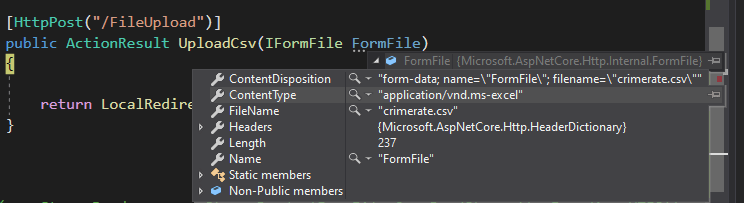
A simple controller was created to handle the uploaded file. The file is buffered into the applications memory in the form of an IFormFile. The nameof the file in the form must match the name of the IFormFile in the controller. Let’s try it out!
[HttpPost("/FileUpload")]
public ActionResult UploadCsv(IFormFile FormFile)
{
    return LocalRedirect("/");
}
Parse the file
Let’s add a way to parse the csv-file, add the package CsvHelper from NuGet:
PM> Install-Package CsvHelperTo parse the file we also need to create a class to bind the file to. The base file contains crimes reported per 100 000 population for different regions in Sweden during the last four years. It looks like this:
År;Nord;Mitt;Stockholm;Öst;Väst;Syd;Bergslagen
2015;8449;10521;18042;10395;12493;12410;10297
2016;8419;10293;18106;10438;11957;12369;10393
2017;8746;10142;16590;10463;11919;12576;10555
2018;8725;10387;16927;10507;11424;12727;10912
So a class is created to match the structure:
public class CrimeRate
    {
        public int År { get; set; }
        public int Nord {get;set;}
        public int Mitt { get; set; }
        public int Stockholm { get; set; }
        public int Öst { get; set; }
        public int Väst { get; set; }
        public int Syd { get; set; }
        public int Bergslagen { get; set; }
    }
Read the uploaded file
Csv-helper reads from a class that implements the abstract class TextReader, so we can create a StreamReader . The bytestream is passed from the uploaded file by invoking the OpenReadStream() method on the FormFileobject:
[HttpPost("/FileUpload")]
public ActionResult UploadCsv(IFormFile FormFile)
{
    using (var StreamReader = new StreamReader(FormFile.OpenReadStream()))
    {
     ...
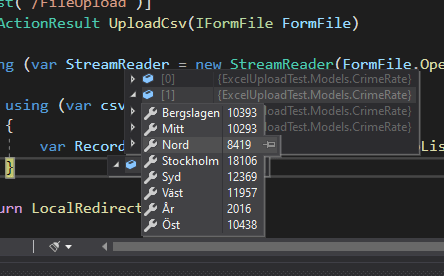
When we have the StreamReader we can pass it to a CsvReader that reads the rows via the GetRecords<T>() method. The complete code for the controller looks like this:
[HttpPost("/FileUpload")]
public ActionResult UploadCsv(IFormFile FormFile)
{
    using (var StreamReader = new StreamReader(FormFile.OpenReadStream()))
    {
        using (var csv = new CsvReader(StreamReader))
        {
            var Records = csv.GetRecords<CrimeRate>().ToList();
        }
    }
    return LocalRedirect("/");
}
Handling the file
In this case the whole file is read and will be processed to store the content in a database after validation has been done. There are of course other scenarios to handling a file, for example writing to a network location or disk.
When dealing with unknown files security is of course a major concern. This is covered in the MVC-documentation. Read it carefully!
 CodeContra